
Connect an AI account
Island Pilot does not provide any AI model: it puts your own subscription or your own key to work. A gateway links this account to the conversations. This page explains how to enable it and sign in to it.
What each gateway requires and uses
Section titled “What each gateway requires and uses”| On screen | What you need | What is used |
|---|---|---|
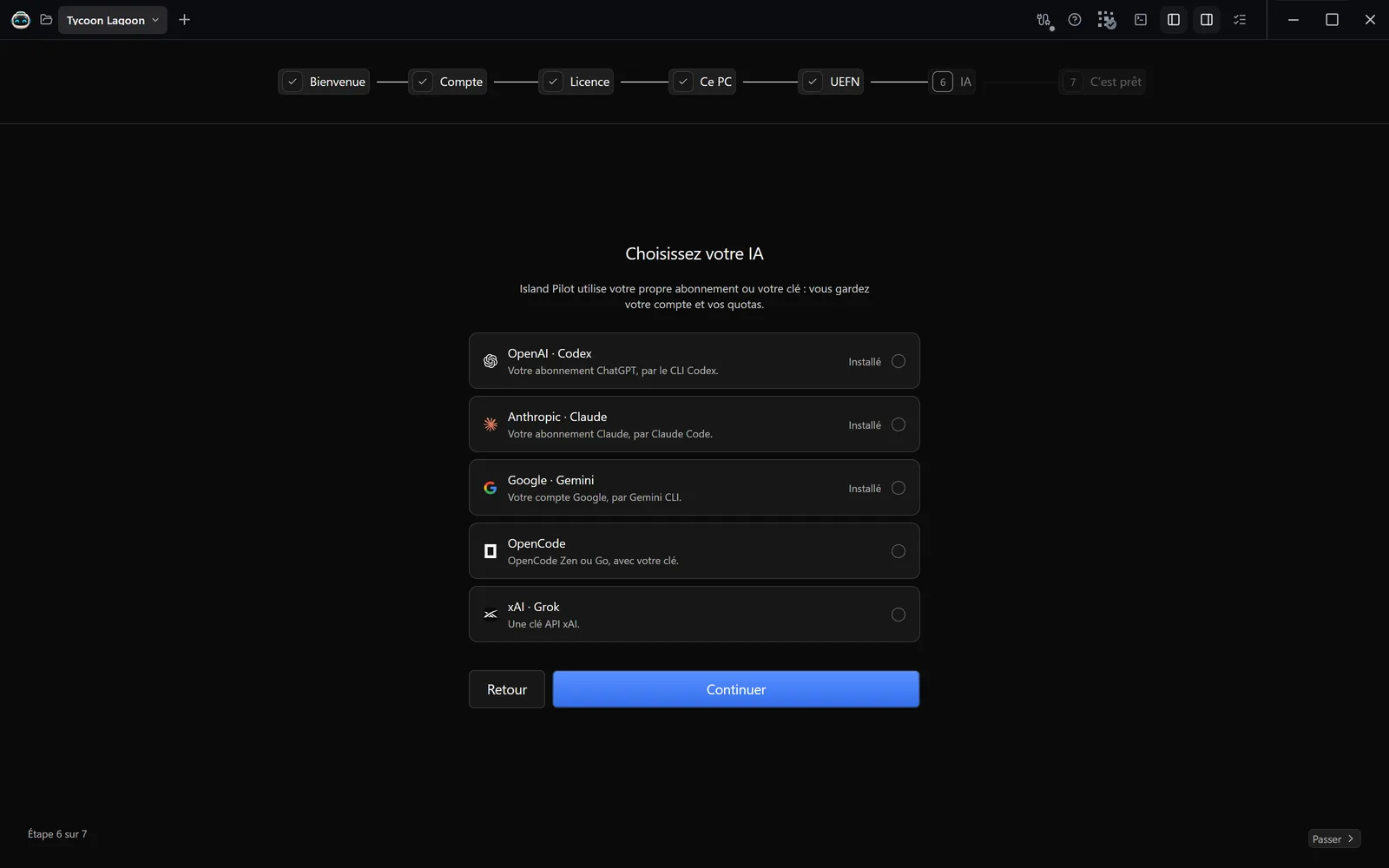
| OpenAI · Codex | A ChatGPT subscription | That subscription’s limits |
| Anthropic · Claude | A Claude subscription | That subscription’s limits |
| Google · Gemini | A Google account and Node.js 22 or later | That account’s quotas. Images go through a Gemini API key, billed separately |
| OpenCode | An OpenCode Zen or Go key, or a provider connected in OpenCode | Zen: pay per use. Go: your subscription |
| xAI · Grok | An xAI API key | The API account’s billing and quotas |
Island Pilot does not sell any access to these models: they run at the provider. Each step of an agent is a call to the model, in Ask and Plan modes too. Opening a project or a conversation uses nothing.
Install and enable
Section titled “Install and enable”The Choisissez votre IA (Choose your AI) screen at first launch offers the same gateways. Afterwards:
- Open Connexions (Connections) in the sidebar: the Store & connexions (Store & connections) page appears. A project must be open.
- Choose the Moteurs IA (AI engines) category.
- On the provider’s card, click Installer (Install).
- Wait for the Passerelle active (Gateway active) status.
Island Pilot first looks for a CLI already on your PC (the CLI is the provider’s program). If it is missing, Island Pilot installs it: with WinGet for Codex, Claude Code and OpenCode, with npm for Gemini CLI. Grok has nothing to install. If the installation fails, the card offers Réessayer (Try again).
To stop offering a gateway in conversations, untick Disponible dans les conversations (Available in conversations) in Paramètres › Comptes IA (Settings › AI accounts). Désinstaller (Uninstall) removes it from Island Pilot; the CLI and its session stay on your PC.
Sign in
Section titled “Sign in”Everything happens in Paramètres › Comptes IA, on the provider’s card. A terminal is a command window, PowerShell for example.
Codex (ChatGPT)
Section titled “Codex (ChatGPT)”- In a terminal, run
codex login. - Sign in to your ChatGPT account. An API key is not accepted.
- Click Vérifier le CLI (Check the CLI). The card shows Connecté (Connected).
Claude Code
Section titled “Claude Code”- In a terminal, run
claude auth login. - Sign in with your Claude subscription. Signing in with an API key is not accepted.
- Click Vérifier le CLI. The card shows Connecté.
Gemini CLI
Section titled “Gemini CLI”- In a terminal, run the command shown on the Google · Gemini card.
- Sign in to your Google account.
- To generate images, also save a key under Clé Gemini API pour les images (Gemini API key for images).
The session is only checked on the first send.
OpenCode Zen or Go
Section titled “OpenCode Zen or Go”- Copy the key from your OpenCode account.
- Paste it under Clé API OpenCode Zen (OpenCode Zen API key) or Clé API OpenCode Go (OpenCode Go API key), then click Enregistrer (Save).
- In the conversation, choose a model:
opencode/uses Zen,opencode-go/uses Go.
For another provider, run opencode auth login in a terminal. The sign-in is only checked on the first send.
- Paste your key under Clé API xAI (xAI API key), then click Enregistrer.
- Click Vérifier la connexion (Check the connection). The message “Connexion xAI vérifiée.” (xAI connection verified.) appears.
Keys stay in the Windows vault. Island Pilot neither reads nor copies the sign-in tokens of your CLIs.
Common errors
Section titled “Common errors”| Message | What to do |
|---|---|
| “Activez la passerelle de ce fournisseur dans Paramètres → Store & connexions, ou choisissez un autre fournisseur.” (Enable this provider’s gateway in Settings → Store & connections, or choose another provider.) | Enable it, or change provider in the conversation. |
| “Arrêtez les agents avant de modifier les passerelles.” (Stop the agents before changing the gateways.) | Wait for the work to finish or stop the agents. |
| “Connectez Codex dans votre terminal avec codex login.” (Sign in to Codex in your terminal with codex login.) | Sign in, then Vérifier le CLI. |
| “Connectez Codex avec ChatGPT (codex login), pas avec une clé API.” (Sign in to Codex with ChatGPT (codex login), not with an API key.) | Sign in to Codex again with your ChatGPT account. |
| “Connectez Claude Code dans votre terminal avec claude auth login.” (Sign in to Claude Code in your terminal with claude auth login.) | Sign in, then Vérifier le CLI. |
| “Connectez Claude Code avec votre abonnement Claude (claude auth login).” (Sign in to Claude Code with your Claude subscription (claude auth login).) | Sign in again with the subscription. |
| “Claude Code : version trop ancienne pour ce modèle. Mettez à jour Claude Code (claude update, ou claude install latest si winget n’a pas encore la version), puis cliquez sur Reprendre.” (Claude Code: version too old for this model. Update Claude Code (claude update, or claude install latest if winget does not have the version yet), then click Reprendre.) | Follow the message. |
| “Node.js 22+ est requis pour Gemini CLI. Installez Node.js puis réessayez.” (Node.js 22+ is required for Gemini CLI. Install Node.js and try again.) | Install Node.js, then Réessayer. |
| “Les images jointes au chat nécessitent Codex, Claude, OpenCode ou Grok. La génération Google reste disponible avec sa clé API.” (Images attached to the chat require Codex, Claude, OpenCode or Grok. Google generation remains available with its API key.) | Gemini CLI does not receive images in the conversation: change provider. |
| “Choisissez un modèle disponible pour votre accès OpenCode dans le sélecteur.” (Choose a model available for your OpenCode access in the selector.) | OpenCode has no Auto mode: choose a model. |
| “Catalogue OpenCode indisponible. Connectez un fournisseur dans OpenCode.” (OpenCode catalogue unavailable. Connect a provider in OpenCode.) | Save a key or run opencode auth login. |
| “Ajoutez votre clé API xAI dans Comptes IA.” (Add your xAI API key in AI accounts.) | Save your key under Clé API xAI. |
| “Service indisponible (HTTP 401). Vérifiez votre clé, le modèle et le quota dans Comptes IA.” (Service unavailable (HTTP 401). Check your key, the model and the quota in AI accounts.) | The HTTP code varies. Check the key and your account. |
| “WinGet est absent. Installez App Installer de Microsoft, ou installez le CLI natif et indiquez son chemin dans Comptes IA.” (WinGet is missing. Install Microsoft’s App Installer, or install the native CLI and give its path in AI accounts.) | Install App Installer, or use Choisir une autre installation (Choose another installation) on the card. |
| “Version du CLI incompatible avec les contrôles d’Island Pilot. Mettez le CLI à jour, puis relancez la détection.” (CLI version incompatible with Island Pilot’s controls. Update the CLI, then run the detection again.) | Update the CLI, then Vérifier le CLI. |
| “Le CLI a interrompu la demande. Vérifiez sa connexion, le modèle et le quota de votre abonnement.” (The CLI interrupted the request. Check its connection, the model and your subscription’s quota.) | Check these three points, then resume. |