
Project memory
Outside its own conversation, an agent remembers nothing. Island Pilot gives it its context back in three ways. This page says where to write what must last.
| Memory | Who writes it | Who receives it | Limit |
|---|---|---|---|
Pilot/PROJECT.md |
The agents, and you | All the project’s agents, with every request | 8,000 characters read |
| Reports | Island Pilot, after every task | Agents whose memory is turned on | 8 at most, the most recent, as extracts |
| Notes mémorisées (Saved notes) | You alone | A single profile | 20,000 characters |
Pilot/PROJECT.md
Section titled “Pilot/PROJECT.md”It is a plain file in your project, for decisions that must last: game rules, systems in place, conventions.
- Agents are asked to keep it up to date when a lasting decision changes. It does not exist until someone writes it, and nothing guarantees that an agent will think of it.
- You can write it yourself: create
PROJECT.mdin thePilotfolder of your project. - It does not depend on Island Pilot’s internal data: it lives with your files.
- Only the first 8,000 characters are read: keep it short.
- It is read even when the profile’s memory is turned off.
Reports
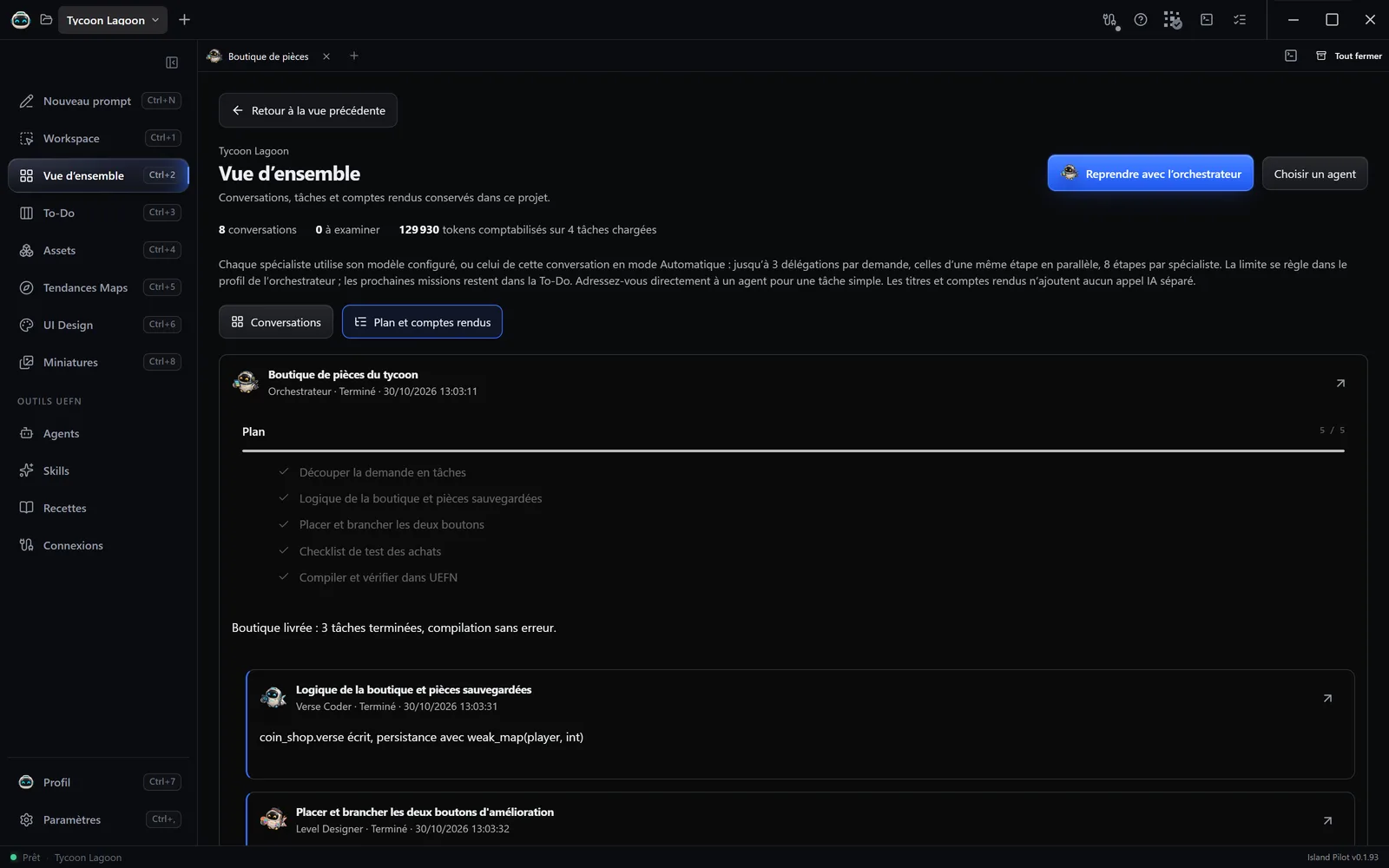
Section titled “Reports”The last reply of each task is kept as a report. No AI call is added for this. You read the reports in Vue d’ensemble › Plan et comptes rendus (Overview › Plan and reports), and on each conversation’s card under Compte rendu conservé (Kept report).
An agent receives the project’s recent reports. It can also search the older ones, if its Retrouver les comptes rendus du projet (Retrieve the project’s reports) tool is turned on. Nothing passes from one project to another.
A profile’s notes
Section titled “A profile’s notes”For a preference specific to one agent:
- Open Agents in the sidebar, then the profile.
- Go to the Mémoire (Memory) tab.
- Write in Notes mémorisées, for example “rounds last 3 minutes”.
- Click Enregistrer l’agent (Save the agent).
Agents never write in these notes. They appear above the message box under Mémoire du profil (Profile memory). They do not apply to the other profiles or to a free conversation.
Turning it on or off
Section titled “Turning it on or off”Utiliser cette mémoire (Use this memory), in the Mémoire tab, is turned on by default and is set for each profile. When it is off, the agent no longer receives your notes or the reports, and can no longer search them. Pilot/PROJECT.md is still read.
The conversation itself
Section titled “The conversation itself”The agent re-reads the history of its conversation, within the limit of its Budget de contexte (Context budget). In a long conversation, older exchanges may be dropped at the next send. So whatever must stay should be noted in Pilot/PROJECT.md.
Agents also see the To-Do and can read your Noteboards and the project’s learned skills.