
The thumbnail studio
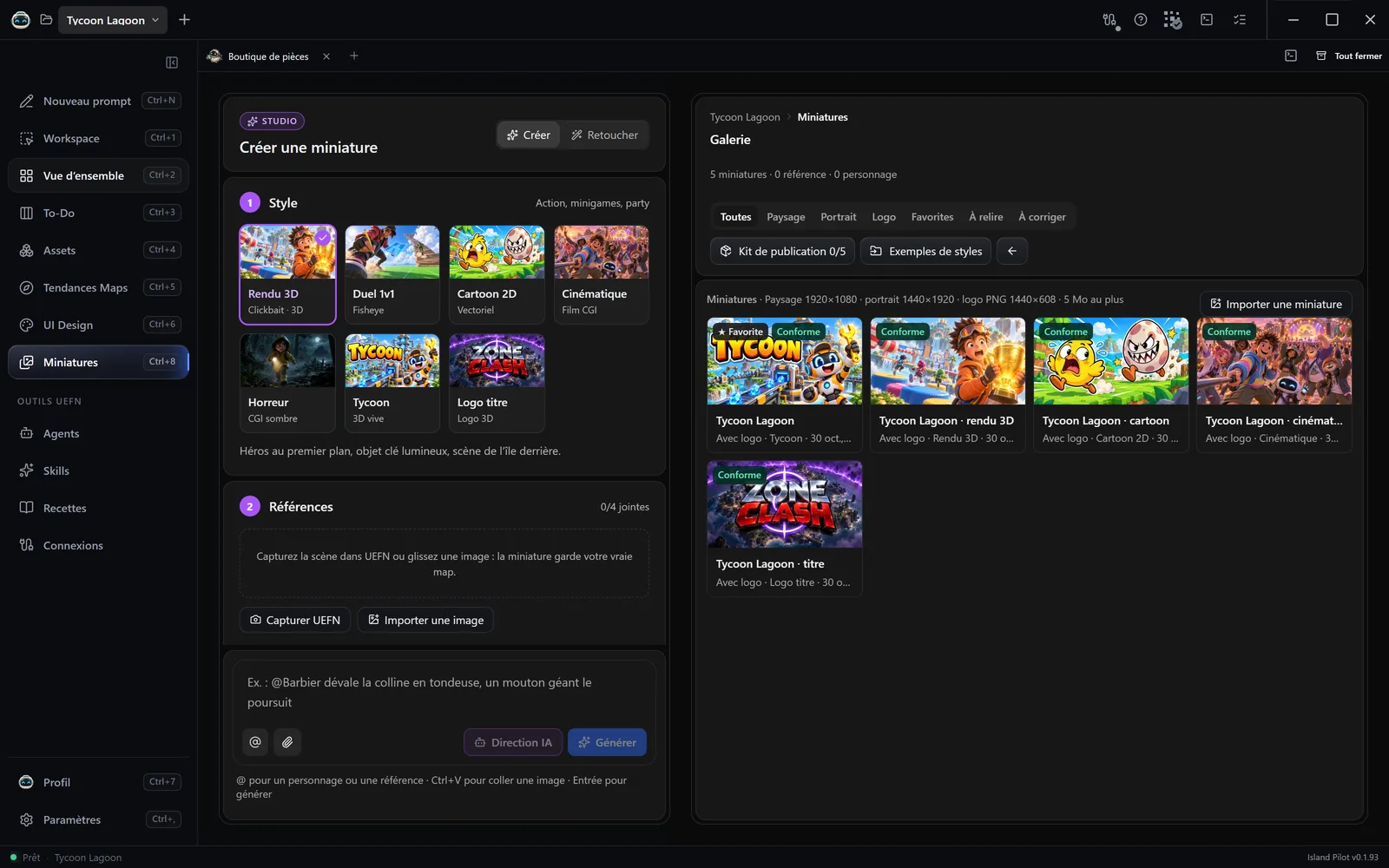
The Miniatures (Thumbnails) tab (Ctrl+8) creates your island’s images for Discover. The Studio, on the left, guides you in three steps. The gallery, on the right, receives the results.
Before you start
Section titled “Before you start”- At least one generator ready: see the table in step 3.
- UEFN connected, only to capture your island from the editor.
Step 1: Style
Section titled “Step 1: Style”| Style | Suits |
|---|---|
| Rendu 3D (3D render) | Action, minigames, party |
| Duel 1v1 (1v1 duel) | 1v1, build fights, races |
| Cartoon 2D | Casual, escape, obby, memes |
| Cinématique (Cinematic) | Roleplay, social, story |
| Horreur (Horror) | Horror, night survival |
| Tycoon | Tycoon, simulator, progression |
| Logo titre (Title logo) | Well-known formats: zone wars, murder… |
Right-clicking a style gives it your example images, 12 at most: Ajouter des exemples de ce style… (Add examples for this style…) or Gérer les exemples (Manage examples). The Exemples de styles (Style examples) button, at the top of the gallery, imports a folder with one subfolder per style. The two most recent examples guide the rendering and the colours, without copying characters or text. They are used for all your projects. Exemples du style (This style’s examples) turns them on or off for a generation.
Step 2: References
Section titled “Step 2: References”A reference keeps your real map in the image. You can attach 4:
- Capturer UEFN (Capture UEFN) captures the level view as you have framed it.
- Importer une image (Import an image) accepts PNG, JPEG and WebP, up to 16 MB. Drag and drop and Ctrl+V also work.
In Personnages (Characters), Ajouter (Add) creates a reusable character:
- Choose its image.
- Give it a one-word Nom (Name), 40 characters at most.
- Add a Description: outfit, colours, accessories. It is sent to the generator.
- Click Ajouter, then write
@Namein your request.
To change a character’s image, delete the character and create it again.
Step 3: Generation
Section titled “Step 3: Generation”- Format: Paysage (Landscape), Portrait or Logo.
- Variante (Variant): Avec logo (With logo) puts the title on the image, Art seul (Art only) puts no text on it.
- Titre (Title), or Texte du logo (Logo text): the project name by default, 80 characters at most.
- Modèle (Model): Auto takes the first generator that is ready, in the order of the table, and that accepts your references.
- Qualité (Quality): 1K, 2K or 4K, with Gemini only.
- Images: from 1 to 4. Each image counts as one generation against your quota or your credits.
| Generator | Models | References at most | What you need |
|---|---|---|---|
| Gemini | Gemini 3.1 Flash Image, Gemini 3 Pro Image, Gemini 3.1 Flash Lite Image | 8 | Its gateway and its key in Paramètres › Comptes IA (Settings › AI accounts) |
| ChatGPT | ChatGPT Images | 8 | Its gateway and your connected account |
| Meshy | Nano Banana, Nano Banana Pro, Nano Banana 2, GPT Image 2 | 5 | The Meshy API key |
| Grok | Grok Imagine | None | Its gateway and its key in Paramètres › Comptes IA |
This total counts the screenshots, the characters, up to 2 examples and, when retouching, the image to retouch. A logo uses neither screenshots nor characters.
Generate
Section titled “Generate”- Describe the scene.
@suggests your characters and your references. If you write nothing, Island Pilot asks for the island’s most striking moment. - Press Enter or click Générer (Generate).
- A tile waits in the gallery. You can switch tabs. Right-clicking the tile offers Annuler la génération (Cancel the generation).
Island Pilot builds the full instruction. You can read it in Prompt envoyé au générateur (Prompt sent to the generator), in the image’s details.
Formats produced
Section titled “Formats produced”| Format | Size | File |
|---|---|---|
| Paysage | 1920×1080 | JPG |
| Portrait | 1440×1920 | JPG |
| Logo | 1440×608 | Transparent PNG |
Each image is 5 MB at most and is stored in Pilot/Thumbnails. Landscape and portrait are cropped at the centre: check what is cut off. For a logo, Island Pilot removes the plain background and centres the lettering. If it cannot, the image carries a warning: generate it again.
Importer une miniature (Import a thumbnail) adds an image of your own: Island Pilot works out its format from its proportions, then converts it.
The gallery
Section titled “The gallery”Filters sort the images, from Toutes (All) to À corriger (To correct). Right-clicking offers, among other things, Générer une variante (Generate a variant), Renommer (Rename) and Supprimer (Delete), which also erases the file from the project.