
First launch
At first launch, an eight-step welcome prepares the app. Only Compte (Account) and Licence are essential. The setup steps have a Passer (Skip) button: you will find them again in Paramètres (Settings).
1. Bienvenue (Welcome)
Section titled “1. Bienvenue (Welcome)”Click Commencer (Start).
2. Compte (Account)
Section titled “2. Compte (Account)”Sign in with the email address you used to buy, with a link received by email. See Sign in.
3. Licence
Section titled “3. Licence”Island Pilot finds your licence thanks to your purchase. You read Licence activée (Licence activated). Otherwise, enter the key received by email. If the licence is already active on another PC, see Change computer.
4. Ce PC (This PC)
Section titled “4. Ce PC (This PC)”The app checks six points, changing nothing, and shows its Dossier de stockage (Storage folder). The detail is in System requirements. A point to check does not block what follows.
5. UEFN
Section titled “5. UEFN”Your agents will read, edit and test the project open in UEFN. What they look at (files, logs, screenshots) is sent to the AI provider of your agent.
- Open UEFN at least once if you have not already.
- Click J’accepte et je configure UEFN (I accept and set up UEFN). Island Pilot enables the automatic start of UEFN’s MCP server and keeps a copy of your settings.
- In UEFN, also enable Python Editor Scripting and UEFN MCP Toolsets, then restart the editor. See Connect UEFN.
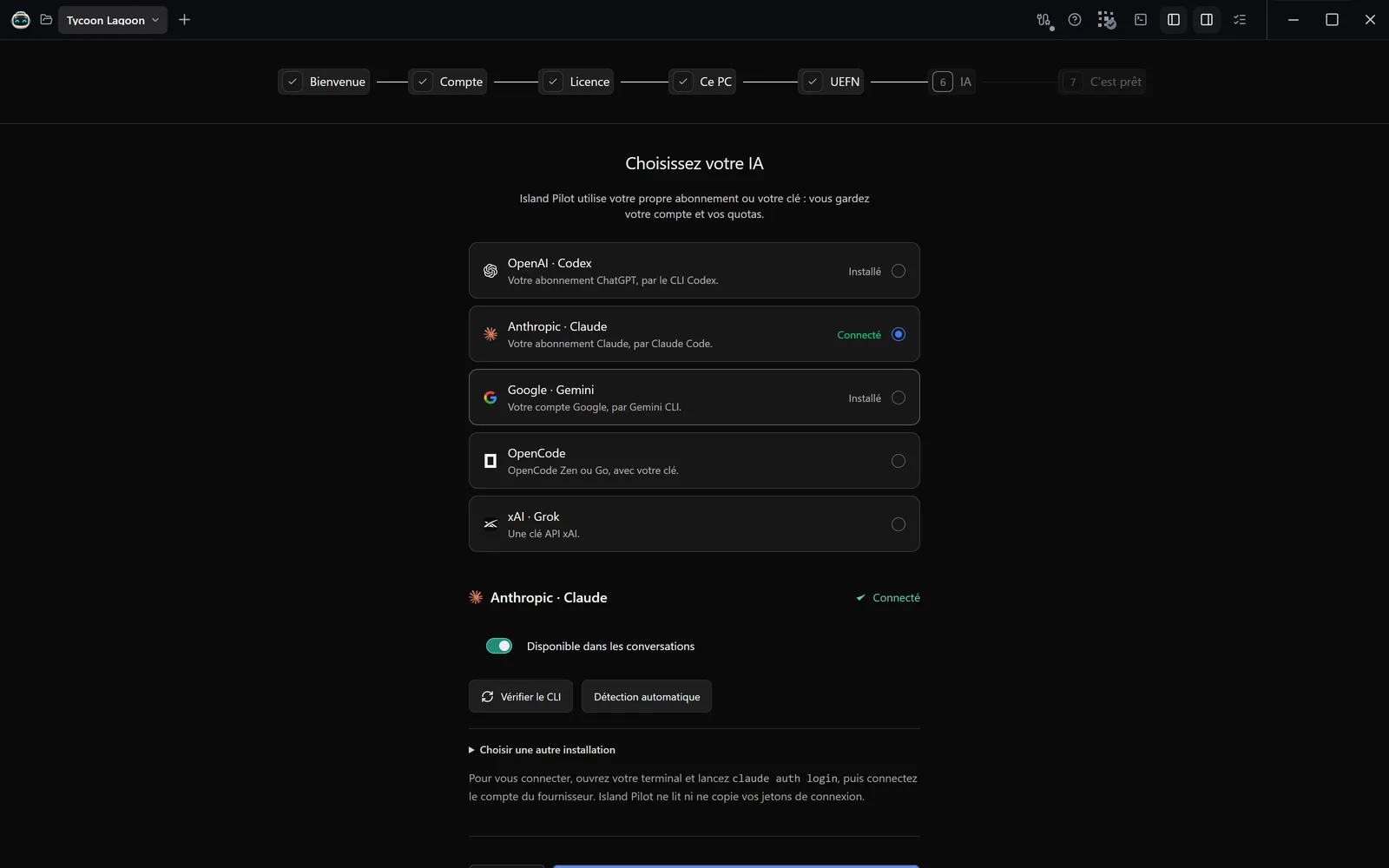
6. IA (AI)
Section titled “6. IA (AI)”Island Pilot uses your own subscription or your key. Choose a provider, then follow its card: Installer la passerelle (Install the gateway), then connect your account. See Connect an AI account.
7. Création 3D (3D creation)
Section titled “7. Création 3D (3D creation)”Choose how your agents create models, textures, rigs and animations. You can change this in Paramètres › Général.
| Choice | What the agents do |
|---|---|
| Blender | They model, texture and rig in Blender, then import into UEFN |
| Meshy | They generate with Meshy AI (API key, credits). Enter your Clé API Meshy (Meshy API key) here |
| Meshy + Blender | Meshy generates a base, Blender cleans it up, textures it and rigs it before import |
| UEFN uniquement (UEFN only) | No external tool: the assets and modelling tools of UEFN, and your own files |
8. C’est prêt (All set)
Section titled “8. C’est prêt (All set)”Tout est prêt (Everything is ready) summarises your choices: Compte, Licence, Ce PC, UEFN, IA, Création 3D. A line may remain À configurer (To set up) or À connecter (To connect).
Click Créer mon premier projet (Create my first project), or Explorer d’abord (Explore first). See Your first project.
Replay the welcome
Section titled “Replay the welcome”Open Paramètres › Visites guidées (Settings › Guided tours), then click Revoir l’accueil (Replay the welcome).
The guided tours
Section titled “The guided tours”The first time you open each section, the Island Pilot robot walks you through it. The keyboard arrows move forward or back, and Esc skips the tour.
To see one again, right-click a sidebar entry, then Revoir la visite guidée (Replay the guided tour). To stop seeing them, untick Lancer la visite des sections que je n’ai pas encore découvertes (Start the tour of sections I have not discovered yet) in Paramètres › Visites guidées.