
The specialists
Each project receives the orchestrator and fourteen specialists, so fifteen ready-to-use profiles. A profile brings together instructions, Skills, tools and an AI engine. This page says who to give what to.
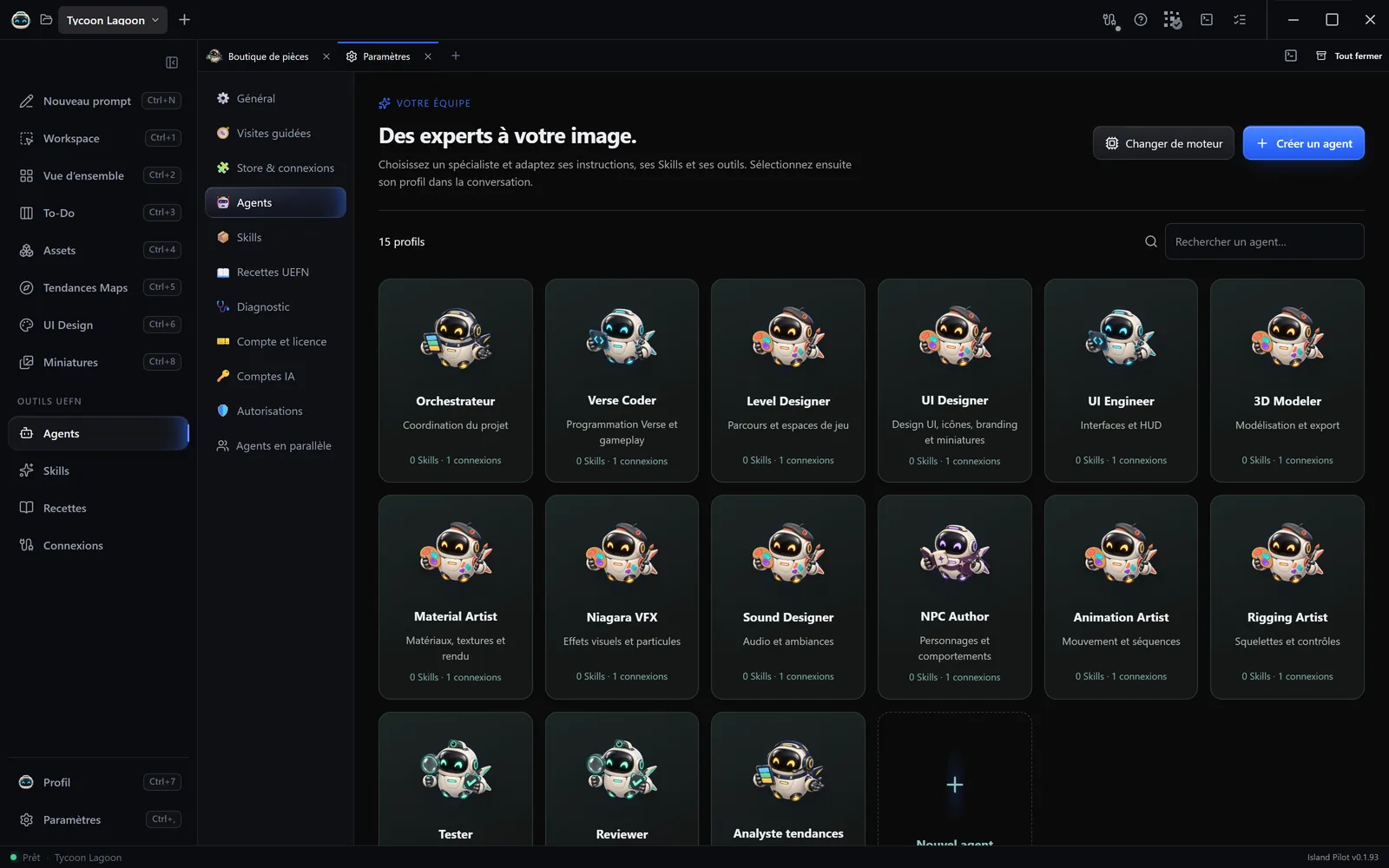
| Profile | Role on screen | Call it for | Intended connections |
|---|---|---|---|
| Orchestrateur (Orchestrator) | Coordination du projet (Project coordination) | Work in several steps or involving several trades: scope, order of tasks, distribution, validation criteria. At the start, only it can delegate. | UEFN |
| Verse Coder | Programmation Verse et gameplay (Verse programming and gameplay) | Writing or fixing Verse files, understanding a compilation error, gameplay, device events, multiplayer state, saving. | UEFN |
| Level Designer | Parcours et espaces de jeu (Routes and play spaces) | Setting up a level, routes, actor placement, cover, landmarks, spawns, terrain. | UEFN, Blender |
| Material Artist | Matériaux, textures et rendu (Materials, textures and rendering) | Creating or repairing materials and textures, surface defects, visual consistency. | UEFN, Blender |
| Niagara VFX | Effets visuels et particules (Visual effects and particles) | Particles, impacts, ambient effects, visual feedback, their runtime cost. | UEFN, Blender |
| 3D Modeler | Modélisation et export (Modelling and export) | Creating or repairing objects and characters, Meshy models, topology, UVs, collisions, export and verified import. | UEFN, Blender, Meshy |
| UI Engineer | Interfaces et HUD (Interfaces and HUD) | Building or repairing a HUD or a menu in UEFN’s widget editor, driven by Verse, and building there the screens from the UI Design tab. | UEFN |
| UI Designer | Design UI, icônes, branding et miniatures (UI design, icons, branding and thumbnails) | Designing HUDs, menus and popups in the UI Design tab, creating the missing icons and the game’s identity, creating and reviewing thumbnails. | Meshy |
| Sound Designer | Audio et ambiances (Audio and atmospheres) | Interactive sounds, ambient loops, music, spatial audio, triggers. | UEFN |
| Rigging Artist | Squelettes et contrôles (Skeletons and controls) | Skeletons, weights, constraints, retargeting, attachment points. | UEFN, Blender, Meshy |
| Animation Artist | Mouvement et séquences (Movement and sequences) | Animations, loops, transitions, retargeting, cinematics. | UEFN, Blender, Meshy |
| NPC Author | Personnages et comportements (Characters and behaviours) | NPCs, creatures and enemies: behaviours, perception, navigation, encounters. | UEFN, Blender, Meshy |
| Tester | Tests et validation (Testing and validation) | Reproducing a bug, running the available checks, writing test cases, reporting a regression. | UEFN, Blender |
| Reviewer | Revue en lecture seule (Read-only review) | Reviewing code, assets, permissions and the evidence claimed, without changing anything. | UEFN, Blender |
| Analyste tendances (Trends Analyst) | Analyse des tendances et concepts UEFN (UEFN trend and concept analysis) | Evaluating Fortnite, Roblox and web games selected in Tendances Maps (Map Trends) and proposing prototypes to test. | None |
Not sure about a term? See the glossary.
A new project also contains Créateur UEFN (UEFN Creator), a general-purpose profile. A Conversation libre (Free conversation) uses no profile: it talks to Pilot, with all the installed Skills and all the active connections of the project.
What they do not do
Section titled “What they do not do”- Tester does not play for you: no automatic playtest is available. It reports what it could not verify.
- Reviewer and Analyste tendances work in read-only mode.
- UI Designer draws, UI Engineer builds in UEFN: a mock-up is not enough to get the screen into the game.
- A specialist to whom a mission has been delegated cannot delegate another one.
Their connections
Section titled “Their connections”An intended connection is only useful if it is installed and enabled.
- Blender and Meshy follow your 3D choice. UI Designer keeps its access to Meshy whatever that choice.
- Tripo and Higgsfield are not given to any profile: assign them with Accès des agents (Agent access), on the connection’s page. See Store & connections.
Using them
Section titled “Using them”- Directly: Nouveau prompt (New prompt), then click the specialist. Suited to a simple task.
- Through the orchestrator: describe the goal, it distributes the work. See The orchestrator.
- In a conversation already under way: Fournisseur et profil (Provider and profile), then Profil facultatif (Optional profile).
At the start, each profile has all the installed Skills (except Analyste tendances, limited to a few guides) and the OpenAI · Codex engine on Automatic. Its instructions are in English, but it answers you in your language. All of this can be changed: see Customise an agent.